Hitting a Vercel function timeout usually means your Next.js API route or serverless function exceeded Vercel's max duration (often 10–60 seconds). You do not need a second deploy target or a separate worker fleet to fix it. Inngest is the solution for Vercel background jobs and long running functions: keep your code on Vercel, break work into durable steps, and run jobs for minutes, hours, or days without a Next.js API timeout killing the request.
This guide explains why Vercel functions time out, then shows how to fix it with Inngest — including a working code example you can adapt for imports, AI workflows, and other background work.
Why Vercel functions time out
Vercel Functions are built for short, request/response work. Each invocation has a hard max duration. When a Next.js route handler, App Router route.ts, or Pages API endpoint still has work left after that limit, Vercel stops the invocation — that is a Vercel function timeout (and the same failure mode developers search for as a Next.js API timeout).
Common triggers:
- Importing or syncing large datasets from a third-party API
- Multi-step AI / LLM pipelines that wait on model responses
- Fan-out email, webhook, or notification workflows
- Any long running function that was written as one blocking script inside an API route
Bumping maxDuration or enabling Fluid Compute can help for borderline cases, but it does not change the model: one HTTP request still has a ceiling. For true Vercel background jobs — work that should outlive the user's request and survive retries — you need durable orchestration, not a longer single timeout. (For a broader rundown of timeout tactics, see How to solve Next.js timeouts.)
Moving that logic to AWS Lambda or a custom worker often “solves” the timeout by adding another deploy target, more secrets, and a second ops surface. You can keep everything in one Next.js app on Vercel instead.
Fix Vercel function timeouts with Inngest
Inngest runs reliable, long-running functions on Vercel by orchestrating your code as independently retried steps over HTTP. Your functions stay in your repo and execute on Vercel; Inngest invokes each step so the total job can run far longer than a single Vercel function timeout, as long as each step finishes within the platform limit.
What you need in practice:
- Break the job into steps that can be retried independently
- Persist step output so later steps resume without redoing finished work
- Orchestrate the sequence outside the original HTTP request (so a Next.js API timeout cannot cancel the whole job)
Inngest's SDK does that with familiar TypeScript/JavaScript: define steps with step.run, group them in one function, and trigger with an event.
export default inngest.createFunction({ id: "invite-waiting-list" },{ event: "invite.users" },async ({ event, step }) => {const emails = await step.run("fetch-waiting-list", async () => {const data = await typeformAPI.responses.list({after: event.data.from,until: event.data.until,pageSize: 1000,});return data.items.map(i => i.answers.find(a => a.email).email)});for (let email of emails) {const inviteCode = await step.run("create-invite-code", async () => {return await createInviteCodeAndSaveInDatabase(email);});await step.run("send-invite-email", async () => {return await emails.sendInviteEmail({ email, inviteCode });});}return { message: `Successfully invited ${emails.length} users` }})
Each step.run is invoked separately over HTTP, so the sum of step time can exceed Vercel's per-request limit. Automatic retries mean a flaky API call retries that step — not the entire import. Trigger it from anywhere in your app:
await inngest.send({name: "invite.users",data: { from: "2023-03-20T00:00:00", to: "2023-03-21T00:00:00" }})
That pattern is the fix for Vercel function timeouts on background work: the API route returns quickly after inngest.send(), and the long running function continues as a durable Vercel background job.
How to break up a long-running job
You may initially think it is tedious to break a long-running background job into smaller pieces. The benefits show up quickly:
- Decoupled logic is easier to isolate and test
- Individual retries avoid failing (and redoing) the entire job
Typical splits:
- Importing data from a file into a database ➡️ Process per row or batch
- Making external API call(s) ➡️ One step per call, so downtime only retries that step

HTTP streaming can help when a client keeps an open connection, but it is a poor fit for background jobs: if the user navigates away, the connection (and often the work) dies. A single script that runs for n minutes is also fragile — fail at minute 15 and you usually restart from scratch, losing or duplicating work.
How does Inngest work with Vercel?
Inngest does not host your code — your functions continue to run on Vercel (or whatever platform you use).
Inngest remotely and securely invokes your functions via HTTP
You keep the same repo, platform, and tooling. There is no need to stand up another runtime or trust a second host with access to your database.
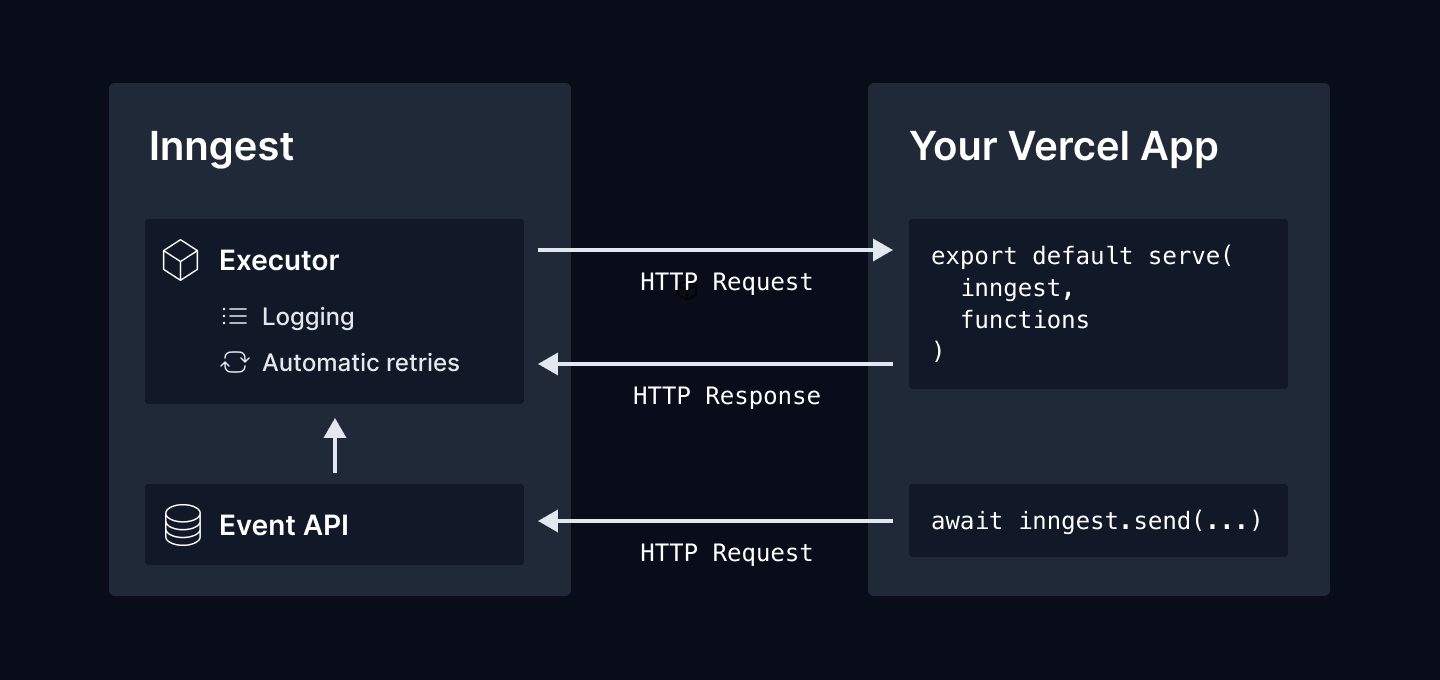
Functions are served to Inngest with a serve handler for your framework. Inngest supports Next.js, Remix, Nuxt, RedwoodJS, and others, including Vercel's edge runtime. Sending an event with inngest.send() tells Inngest to invoke the matching function.
Inngest invokes each step independently via HTTP
Because each step is a separate HTTP invocation, you only need each step under the 10- or 60-second timeout for your plan. A job that would take ~500 seconds as one request becomes many short requests within platform limits — so Vercel long running functions can span minutes or hours.
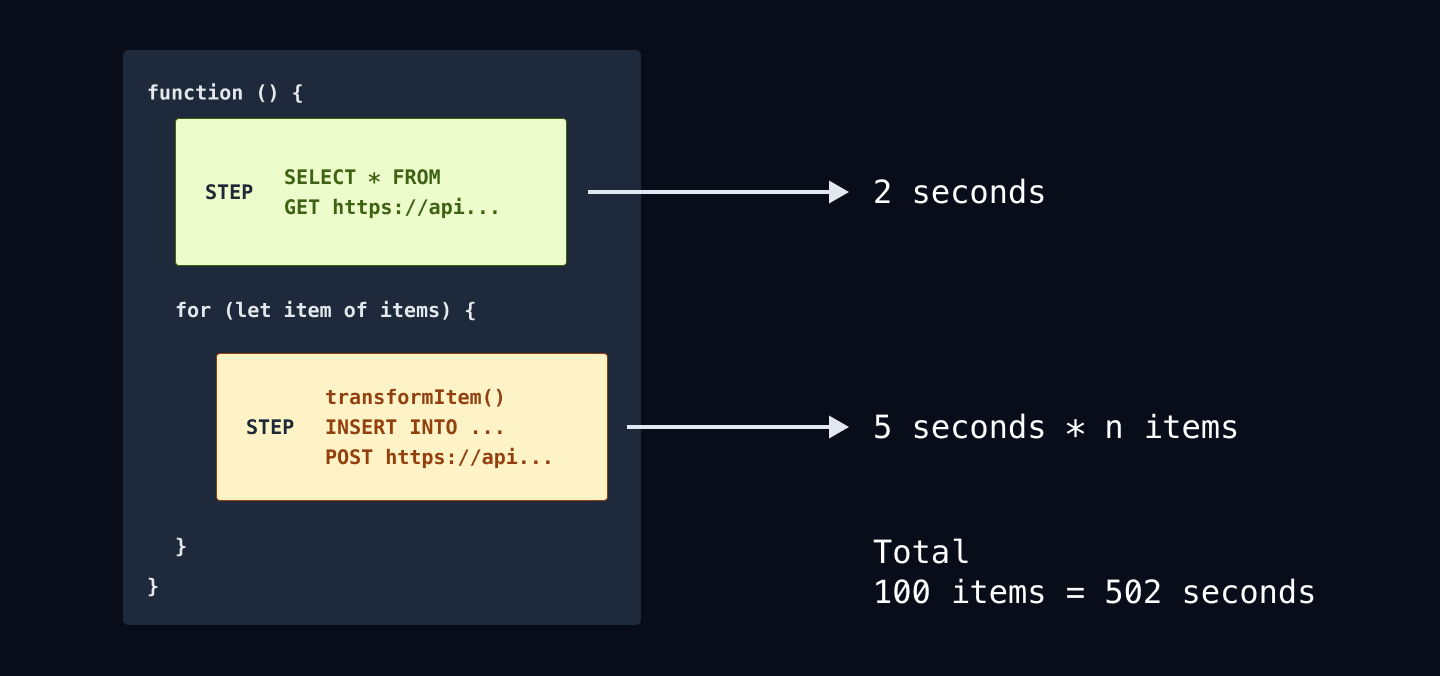
As you can see — it's just JavaScript. The Inngest SDK's step.run wraps each part of the function. With automatic retries built in, you can run long background jobs reliably.
How to deploy your functions
Install the official Inngest integration on Vercel. On each deploy, the integration tells Inngest where your app lives; Inngest discovers your functions and you are ready to go.
What else can you do?
Other patterns that pair well with long-running Vercel background jobs:
Run steps in parallel
Use Promise.all to kick off any number of steps in parallel just like you would with any array of Promises.
inngest.createFunction({ id: "shopify-product-import", concurrency: 10 },{ event: "shopify/import.requested" },async ({ event, step }) => {const products = await step.run("fetch-all-products", async () => {return await shopify.rest.Product.all()})// Use Promise.all to kick off all steps in parallel!Promise.all(products.map((product) =>step.run("import-product", async () => {await database.upsertProduct({storeId: event.data.storeId,product,})})))})
Put the function to sleep
Use step.sleep to pause your function for hours, days, or weeks. Inngest will wait and then continues running your function steps after the sleep period you specify.
inngest.createFunction({ id: "new-user-email-drip-campaign" },{ event: "api/account.created" },async ({ event, step }) => {await step.run("send-welcome-email", async () =>await sendWelcomeEmail(event.user.email))await step.sleep("delay-second-email", "2d")await step.run("send-product-tips-email", async () =>await sendTipsEmail(event.user.email))await step.sleep("delay-third-email", "3d")await step.run("send-how-tos-email", async () =>await sentHowTosEmail(event.user.email))})
Schedule work in the future
Use step.sleepUntil to schedule a step in the future at a specific time:
inngest.createFunction({ id: "send-reminder" },{ event: "dinner_reservation.created" },async ({ event, step }) => {const reservationAt = new Date(event.data.reservationTimestamp);const dayBefore = new Date(reservationAt - 24 * 60 * 60 * 1000);await step.sleepUntil(dayBefore)await step.run("send-reminder-text-message", async () =>await sendSMSReminder(event.user.phone, event.data))})
Check out our docs to explore what else you can do →
What are you going to build?
Now that you can fix Vercel function timeouts and run long-running background jobs on Vercel, what will you build?
- Third-party API imports
- Data pipelines
- OpenAI / GPT-4 processing
- Schedule emails or reminders